
Workbench Cockpit
The Cockpit is a PostgreSQL schema explorer and dependency graph for VS Code. It follows the exact Connection and database it was opened from and the current Code Moniker index of that Connection; it never displays table rows.
Cockpit map
Each numbered marker corresponds to an explanation below the image.
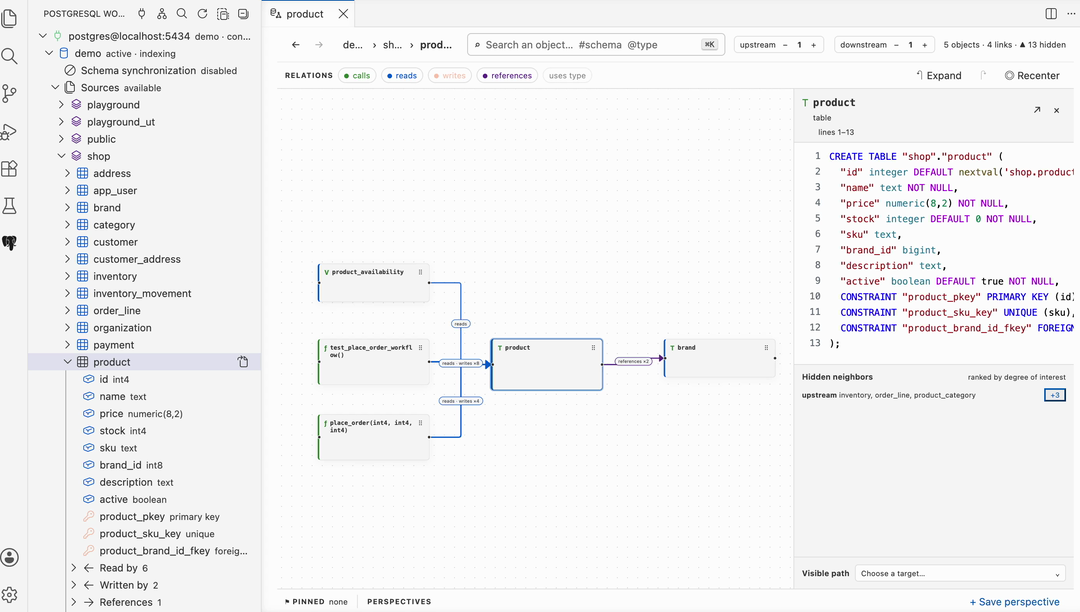
- Schemas tree. Browse schemas and indexed objects lazily. Expanding an object shows direct incoming and outgoing relations known by the index.
- Scope and search. Search by object name,
#schema, or@type. Upstream and downstream controls set graph exploration depth, not zoom. - Relation filters. Show or hide calls, reads, writes, references, and type usages without changing the underlying index.
- Focused graph. The selected object anchors the view. Expand neighbors in place, drag nodes to preserve a mental map, and recenter without recomputing the graph.
- Source inspector. Read the indexed PostgreSQL definition for the selected object. Hidden neighbors disclose relations omitted by current depth and ranking limits.
- Pins and perspectives. Pin objects across navigation and save a perspective to restore scope, filters, selected object, positions, and expansion settings.
Where the relations come from
The Cockpit and the Schemas tree use the same indexed relations. They show direct calls, reads, writes, references, and type usages from the PostgreSQL definitions currently indexed for that Connection and database. Indexing another Connection never invalidates an open Cockpit.
Automatic DDL synchronization
Schema synchronization is opt-in. PostgreSQL event triggers publish committed structural changes to a dedicated listener. Identifiable objects and their direct indexed dependants are reprojected incrementally. Ambiguous drops, broad schema changes, missed events, or failed incremental updates make the index stale and require a complete refresh.
Enable postgresql-workbench.workbench.schemaSync.enabled, then run
Provision Schema Synchronization explicitly. PostgreSQL superuser privileges
are required to create database event triggers.
A fresh index means structural definitions are synchronized. It does not mean table data was read or monitored.
INSERT,UPDATE, andDELETEnever trigger Workbench index synchronization.